Mastering Texture: A Practical Guide to Scruffy Blotchy Messy Procreate Brushes
In the evolving landscape of digital illustration, texture is often the differentiator between a flat, sterile image and a piece that feels tactile and alive. For artists working within the iPad ecosystem, finding the right tools to replicate organic imperfections can be a challenge. This is where specialized brush sets, such as Scruffy Blotchy Messy Procreate Brushes, become essential resources. Unlike standard round or square brushes that produce uniform strokes, this collection is designed specifically to introduce controlled chaos into your workflow.
This article explores the utility, distinct characteristics, and practical applications of these five specific brushes. By understanding how they function and comparing them to broader categories of digital tools, you can determine if this set aligns with your artistic goals or if alternative approaches might better serve your needs.
Deconstructing the Brush Set: Function and Form
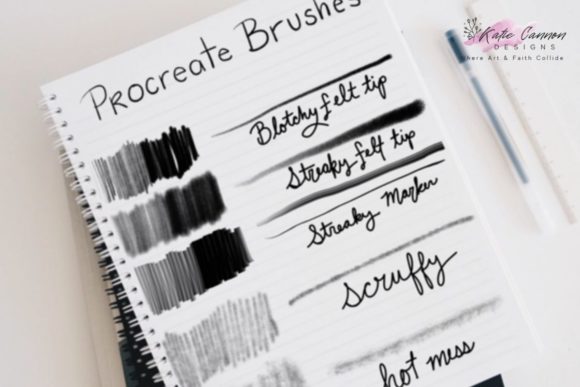
The Scruffy Blotchy Messy Procreate Brushes package includes five distinct tools, each engineered to solve specific textural problems. Understanding the mechanics of each brush helps in predicting how they will behave under different pressure settings and canvas resolutions.
- Blotchy Felt Tip Brush: This tool mimics the uneven ink distribution of a dried-out marker. It is ideal for creating soft, porous edges that blend naturally into the background, avoiding the harsh lines typical of vector-style drawing.
- Streaky Felt Tip Brush: While similar to the blotchy variant, this brush emphasizes directional streaks. It replicates the look of a marker dragged quickly across rough paper, leaving behind gaps and variations in opacity that suggest speed and movement.
- Streaky Marker Brush: Distinct from the felt tips, this brush offers a slightly harder edge with internal texture. It is particularly effective for bold outlines or filling in large areas where you want to maintain a hand-drawn, imperfect aesthetic without losing definition.
- Scruffy Brush: As the name implies, this is the workhorse for general distressing. It creates irregular, broken strokes that are perfect for adding grit to shadows or creating a worn, vintage appearance on surfaces.
- Hot Mess Brush: This is the most aggressive tool in the set. It produces highly irregular, splattered, and chaotic marks. It is best used sparingly for accent details, background noise, or when aiming for a high-energy, abstract expressionist style.
What makes Scruffy Blotchy Messy Procreate Brushes distinct is not just the visual output, but the underlying algorithm that balances randomness with usability. Many free or generic textured brushes suffer from repetitive patterns, where the same "noise" tile becomes visible upon close inspection. These brushes are designed to minimize repetition, ensuring that long strokes remain visually engaging and organic.
Comparing Textured Brushes to Standard Digital Tools
When evaluating whether to integrate Scruffy Blotchy Messy Procreate Brushes into your toolkit, it is helpful to compare them against standard digital painting approaches. Most default brush libraries prioritize cleanliness and precision. They are excellent for technical illustrations, clean line art, and smooth gradients. However, they often require significant manual effort to achieve a "hand-made" look.
The Efficiency of Pre-Textured Strokes
Using standard round brushes to create a distressed look typically involves a multi-step process: laying down flat color, adding a separate texture layer, adjusting blending modes, and manually erasing parts to create wear. In contrast, Scruffy Blotchy Messy Procreate Brushes bake this texture directly into the stroke. This reduces the number of layers required and speeds up the iteration process. For professionals working under tight deadlines, this efficiency is a significant advantage.
Control vs. Chaos
A common concern when adopting messy brushes is the loss of control. Standard tools offer predictable outcomes, whereas textured brushes introduce variability. The trade-off here is between precision and authenticity. If your project requires geometric perfection or crisp typography, these brushes may be counterproductive. However, for editorial illustrations, concept art, or expressive portraits, the slight unpredictability adds a human element that rigid digital tools often lack.
Ideal Use Cases and Artistic Styles
Identifying the right context for Scruffy Blotchy Messy Procreate Brushes ensures you get the most value from the purchase. These tools are not universal solutions, but they excel in specific genres and applications.
- Editorial and Journalistic Illustration: Modern editorial art often favors a loose, sketchy aesthetic that conveys urgency or opinion. The Streaky Marker and Scruffy Brush are well-suited for this style, allowing artists to create compelling visuals that stand out against polished photography.
- Vintage and Retro Design: Creating assets that mimic mid-century print ads or worn posters requires intentional imperfection. The Blotchy Felt Tip can simulate the ink bleed of old printing presses, adding authenticity to retro-themed projects.
- Character Concept Art: When designing characters, especially those in gritty or realistic settings, clean lines can look too sterile. Using the Hot Mess Brush for clothing textures or environmental debris can help ground the character in their world.
- Background Texturing: Instead of importing external photo textures, which can increase file size and complicate editing, these brushes allow you to paint backgrounds directly. This keeps the artwork fully vector-free and editable within Procreate.
Limitations and Considerations
While Scruffy Blotchy Messy Procreate Brushes offer significant benefits, they are not without limitations. Being aware of these constraints helps manage expectations and prevents frustration during the creative process.
Resolution Dependency: Textured brushes can sometimes appear pixelated or overly coarse if used at very small sizes or on low-resolution canvases. To maintain the integrity of the texture, it is advisable to work on larger canvases and scale down only after the primary detailing is complete.
Learning Curve: Artists accustomed to smooth, responsive brushes may initially find the drag and resistance of textured brushes disorienting. There is a learning curve associated with understanding how pressure sensitivity interacts with the texture grain. It may take time to develop the muscle memory needed to control the Hot Mess Brush effectively.
Overuse Risk: Because these brushes are visually striking, there is a temptation to use them exclusively. However, a composition filled entirely with heavy texture can become visually exhausting. The most effective approach is to use Scruffy Blotchy Messy Procreate Brushes as accents, contrasting them with cleaner, simpler shapes to create visual hierarchy.
Making the Decision: Is This Set Right for You?
Choosing the right digital tools is a subjective process that depends on your existing workflow and artistic identity. To help you decide, consider the following factors:
If you frequently find yourself adding manual noise, grain, or distress effects to your digital paintings, this set will likely streamline your process. It is particularly valuable for artists who want to move away from the "perfect" digital look and embrace a more traditional, media-inspired aesthetic. The variety within the five brushes allows for a range of expressions, from subtle wear to aggressive abstraction.
Conversely, if your work focuses on clean line art, flat design, or hyper-realistic rendering where texture is added via photo bashing or 3D overlays, these brushes may see limited use. In such cases, investing in high-quality blending brushes or shape stamps might be a more strategic allocation of resources.
Ultimately, Scruffy Blotchy Messy Procreate Brushes represent a specialized tool for a specific artistic intent. They bridge the gap between digital convenience and analog charm. By incorporating them thoughtfully, you can add depth, character, and a distinctive voice to your digital artwork. As with any tool, mastery comes from experimentation. Try integrating one brush at a time into your existing projects to gauge its impact before overhauling your entire workflow.