Transforming Digital Art with Ribbon Procreate Brushes
Digital illustration has evolved from a niche hobby into a robust professional industry, yet many artists still struggle with the tedious process of rendering complex textures. This is where specialized tools like Ribbon Procreate Brushes change the workflow entirely. Instead of spending hours manually painting folds, shadows, and highlights to create the illusion of fabric or decorative strips, creators can utilize pre-engineered brush heads that replicate these effects instantly. The core value proposition here is not just about saving time; it is about maintaining creative momentum. When you remove the friction of technical execution, you allow your artistic vision to flow more naturally.
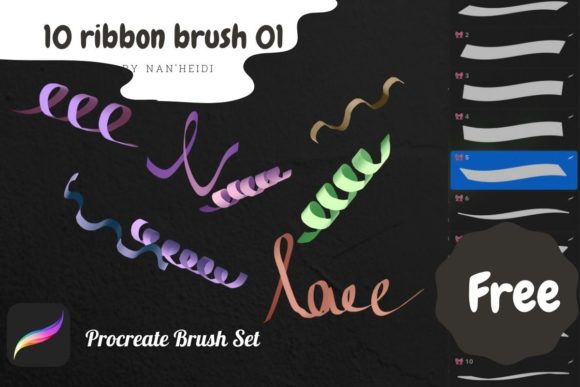
The package typically includes ten distinct brush heads, each designed to mimic different types of ribbons, from satin and silk to rougher burlap or matte cotton textures. For a digital artist, having this variety in one toolkit means you are prepared for diverse projects without needing to switch between multiple apps or purchase disparate assets. Whether you are designing wedding invitations, creating character costumes, or adding festive elements to social media graphics, these brushes serve as a versatile foundation for high-quality output.
Real-World Applications for Creators and Entrepreneurs
Understanding where and when to use these tools is crucial for maximizing their potential. Let’s look at specific scenarios where Ribbon Procreate Brushes become indispensable.
Stationery and Invitation Design
Small business owners who sell custom stationery on platforms like Etsy often face tight deadlines. A common request involves wedding invitations featuring elegant bow ties or ribbon borders. Manually drawing these with perfect symmetry and realistic lighting is incredibly time-consuming. By using a ribbon brush, a designer can lay down the base shape in seconds, adjust the color to match the client’s theme, and add subtle shading to give it depth. This efficiency allows freelancers to take on more clients without burning out, directly impacting their bottom line.
Social Media Content Creation
Marketers and bloggers constantly need eye-catching visuals for Instagram stories, Pinterest pins, or blog headers. During holiday seasons or special sales events, incorporating decorative elements like gift ribbons or celebratory banners can significantly increase engagement. Instead of searching for stock photos that may not fit the exact color palette or composition, creators can draw custom ribbon elements that integrate seamlessly with their brand identity. This level of customization helps brands stand out in a saturated digital landscape.
Character Design and Fashion Illustration
For concept artists and fashion illustrators, clothing details define the personality of a character. Ribbons are frequently used in anime-style art, historical costumes, and modern streetwear. Using standard round brushes to paint flowing fabric requires a high level of skill and patience. With specialized ribbon brushes, artists can focus more on the overall silhouette and pose of the character rather than getting bogged down in the minutiae of every fold. This is particularly useful for students or hobbyists who are still developing their anatomy and drapery skills but want their final pieces to look polished.
Why These Brushes Matter for Different Users
The benefit of Ribbon Procreate Brushes varies depending on your experience level and professional goals. Here is how different users might leverage this tool:
- Educators: Teachers creating digital worksheets or reward charts can use ribbon brushes to create badges, certificates, and decorative borders. This makes learning materials more visually appealing for students without requiring advanced graphic design skills.
- Hobbyists: Casual users who enjoy digital journaling or scrapbooking can add a touch of elegance to their daily logs. The ease of use means they spend less time figuring out technical settings and more time enjoying the creative process.
- Publishers: Independent authors designing book covers or chapter headers can use these brushes to add classic, ornamental touches that suggest genre and tone, such as romance or historical fiction.
The key takeaway is accessibility. You do not need to be a master illustrator to achieve professional-looking results. The brushes handle the complex light and shadow calculations, allowing users of all skill levels to produce work that looks intentional and refined.
What to Consider Before Downloading
While the promise of quick, beautiful results is appealing, it is important to approach any new digital asset with a critical eye. Before downloading or purchasing Ribbon Procreate Brushes, consider the following practical aspects to ensure they fit your workflow.
Compatibility and Software Version
Procreate updates frequently, and brush engines can change. Ensure that the brush set is compatible with your current version of the app. Most modern brushes work well with recent updates, but checking the developer’s notes can save you from frustration later. Additionally, verify that you are using an iPad that supports the latest Procreate features to get the full benefit of pressure sensitivity and tilt functionality, which are essential for realistic ribbon rendering.
Customization Potential
No single brush fits every scenario perfectly. Look for brushes that allow for easy adjustment within Procreate’s Brush Studio. Can you change the spacing? Can you adjust the opacity flow? The ten heads included in this set should offer a range of base styles, but the ability to tweak them means you can create hundreds of variations. A good brush set acts as a starting point, not a rigid constraint. Test the brushes by drawing slow, deliberate strokes and fast, gestural lines to see how they respond.
Integration with Your Style
Consider your existing aesthetic. If your work is highly minimalist and flat, intricate 3D-style ribbon brushes might clash unless used sparingly. Conversely, if you specialize in hyper-realistic illustrations, ensure the brushes have enough texture detail to hold up under close inspection. It is helpful to look at sample artwork provided by the creator to see if the style aligns with your vision. Remember, these tools are meant to enhance your unique voice, not replace it.
Maximizing Value Through Practice
Owning the tool is only half the battle; knowing how to wield it effectively is what separates amateur results from professional work. Start by experimenting with layer modes. Placing a ribbon stroke on a "Multiply" layer can create realistic shadows, while "Overlay" or "Soft Light" can add highlights that make the fabric appear shiny or metallic. Combining the ribbon brushes with standard smudge tools can further soften edges and blend the ribbons into the background, making them feel like part of the scene rather than stickers placed on top.
Another effective technique is to use the brushes for underpainting. Lay down the general shape and flow of the ribbon using the specialized brush, then refine the details manually. This hybrid approach gives you the speed of the preset with the control of hand-painting. It is a method widely used in concept art studios to meet tight deadlines without sacrificing quality.
Ultimately, Ribbon Procreate Brushes represent a smart investment for anyone looking to streamline their digital art process. By automating the most tedious aspects of drawing fabric and decorative elements, these tools free up mental energy for creativity and storytelling. Whether you are a seasoned professional looking to optimize your workflow or a beginner eager to create beautiful designs, understanding how to integrate these brushes into your routine can lead to significant improvements in both the quality of your work and your satisfaction as a creator.