Unlocking Creative Potential with the Magic Fx Brush Set
In the rapidly evolving world of digital art, artists are constantly searching for tools that bridge the gap between technical precision and organic expression. Whether you are a seasoned concept artist or an enthusiastic hobbyist just starting your journey, the right set of brushes can significantly alter your workflow and the final quality of your work. This is where the Magic Fx Brush Set enters the conversation, offering a versatile solution for creators who want to move beyond standard painting tools. Unlike traditional brush packs that merely offer static textures, this collection provides dynamic, interactive tools designed to enhance sketches, build robust bases for illustrations, and add professional-grade effects to concept art.
The Challenge of Digital Texture and Depth
One of the most common hurdles digital artists face is achieving a natural, hand-crafted look without spending hours on manual detailing. Standard round brushes often feel too sterile, while complex texture overlays can appear pasted-on and disconnected from the underlying artwork. Many artists struggle to find a middle ground where efficiency meets aesthetic depth. You might find yourself stuck in a loop of importing dozens of PNG overlays, only to realize they do not blend well with your lighting or perspective. This disconnect can slow down production time and stifle creative flow, particularly when working under tight deadlines for client projects or personal portfolios.
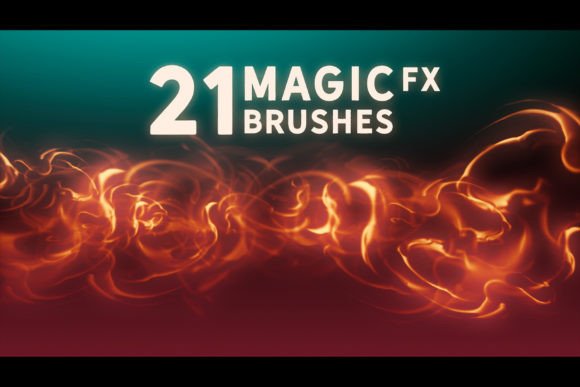
The need for tools that allow for genuine painting rather than simple stamping is critical. Artists require brushes that respond to pressure, tilt, and speed, mimicking the behavior of traditional media while leveraging the advantages of digital software. The goal is not just to add noise or grain but to integrate effects seamlessly into the composition. This is precisely the problem the Magic Fx Brush Set aims to solve by providing twenty-one unique dynamic brushes that behave like real artistic instruments.
Dynamic Painting Over Static Stamping
A defining feature of the Magic Fx Brush Set is its ability to function as actual painting tools rather than mere stamp overlays. While many effect brushes simply place a pre-made image onto your canvas, these brushes are engineered to react to your stylus movements. This means you can paint light leaks, smoke, sparks, or organic textures with the same fluidity as you would sketch a character’s outline. This dynamic capability allows for greater control over the density, direction, and fade of the effect, ensuring that every stroke feels intentional and integrated into the artwork.
For concept artists, this distinction is vital. When developing environments or character designs, you often need to quickly iterate on ideas. Being able to paint atmospheric effects directly onto your sketch helps visualize the mood and lighting early in the process. Instead of waiting until the final rendering stage to add details, you can use these brushes to establish a strong base for your illustration. This approach saves time and helps maintain a cohesive visual language throughout the piece.
Versatility Across Major Digital Platforms
Compatibility is a major concern for digital artists who may switch between software depending on the project requirements. The Magic Fx Brush Set addresses this by offering broad support across industry-standard applications. It is fully compatible with Photoshop CC, making it an excellent addition for professionals who rely on Adobe’s robust ecosystem. Furthermore, it supports Procreate 5.0, catering to the growing number of artists who prefer the portability and intuitive interface of iPad-based creation.
Beyond these two giants, the set includes .abr files that can be imported into Clip Studio Paint v1.10.5 or newer, as well as Affinity Photo. This cross-platform flexibility ensures that you are not locked into a single program. Whether you are refining a comic page in Clip Studio or editing a photo manipulation in Affinity, you can bring the same consistent look and feel to your work. This universality makes the brush set a valuable long-term investment, as it adapts to your changing software preferences and project needs.
Practical Applications for Different Art Styles
The utility of the Magic Fx Brush Set extends across various artistic disciplines. For illustrators focusing on fantasy or sci-fi themes, the six extra layer styles included in the package offer immediate enhancements. These styles can be used to create glowing magical effects, futuristic holograms, or ethereal auras without needing to master complex blending mode adjustments manually. By applying these styles, artists can achieve high-impact visuals with minimal effort, allowing them to focus more on composition and storytelling.
Sketch artists will also find significant value in this toolset. The dynamic nature of the brushes makes them ideal for loose, expressive sketching. You can use them to block in shadows, suggest foliage, or indicate motion blur quickly. This helps in creating a lively base that retains energy, which is often lost when over-rendering early stages. For concept art, where speed and clarity are paramount, these brushes help communicate ideas effectively to clients or team members by adding contextual atmosphere instantly.
Maximizing Your Workflow with Layer Styles
Understanding how to leverage the six extra layer styles is key to unlocking the full potential of the Magic Fx Brush Set. These styles are not just filters; they are preset configurations that interact with the brush dynamics to produce specific visual outcomes. For example, one style might enhance contrast and saturation to make a fire effect pop, while another might soften edges and add glow for a dreamy, magical ambiance. Experimenting with these styles allows you to customize the look of your brushes to match the specific tone of your project.
To get the best results, consider using these brushes on separate layers. This non-destructive workflow enables you to adjust opacity, blending modes, and scale without affecting the underlying drawing. You can also combine multiple brushes from the set to create complex effects. For instance, painting a base cloud texture with one brush and adding highlights with another can create a volumetric, three-dimensional look. This layered approach gives you granular control over the final appearance, ensuring that the effects serve the artwork rather than overpowering it.
Considerations for Implementation
While the Magic Fx Brush Set offers powerful tools, effective use requires practice and experimentation. It is recommended to start by testing each of the twenty-one brushes on a blank canvas to understand their unique behaviors. Pay attention to how they respond to different pressure levels and stylus angles. This familiarity will help you predict how they will perform in complex illustrations. Additionally, keep your software updated to ensure full compatibility, especially if you are using Clip Studio Paint or Procreate, as newer versions often introduce changes to brush engine mechanics.
Artists should also consider the resolution of their canvas when using these brushes. High-resolution artworks may require adjustments to brush spacing and size to maintain clarity and avoid pixelation. Conversely, working at lower resolutions might benefit from larger, bolder strokes. Understanding these technical nuances will help you adapt the brushes to any project size, from web icons to large-format prints.
Conclusion
The Magic Fx Brush Set represents a thoughtful approach to digital art tools, prioritizing dynamic interaction and versatility over static repetition. By addressing the common challenges of texture integration and workflow efficiency, it empowers artists to create more engaging and professional-looking work. Whether you are sketching ideas, building concept art, or finishing detailed illustrations, these brushes provide the flexibility and creative spark needed to elevate your digital portfolio. With compatibility across Photoshop, Procreate, Clip Studio Paint, and Affinity Photo, it stands as a practical and adaptable resource for any serious digital creator looking to refine their craft.