Integrating the Modern Abstract Brush Collection into Professional Digital Workflows
In the fast-paced world of digital design, efficiency and distinctiveness are often at odds. Designers, illustrators, and content creators frequently struggle to balance the need for rapid turnaround times with the demand for unique, high-quality visual assets. This is where specialized toolsets become critical components of a sustainable creative workflow. The Modern Abstract Brush Collection represents more than just a set of digital stamps; it is a strategic resource designed to streamline the artistic process while enhancing the visual depth of your projects. By understanding how to effectively integrate these tools into your existing pipeline, you can significantly reduce production time without compromising on aesthetic quality.
Understanding the Asset Structure and Compatibility
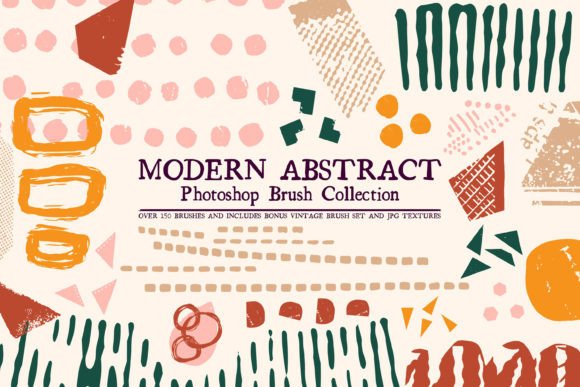
Before implementing any new asset into your workflow, it is essential to understand its technical constraints and capabilities. This collection consists of over 150 brushes specifically engineered for Adobe Photoshop. It is crucial to note that these brushes are distributed in the .abr format, which means they are exclusively compatible with Photoshop. They will not function in Procreate, Clip Studio Paint, or other raster-based editing software. Recognizing this limitation early prevents workflow disruptions and ensures you are using the right tool for the right platform.
The collection is not limited to the primary brush set. It includes a free bonus set of vintage-styled Photoshop brushes and four high-resolution JPG textures. These additional assets are not mere afterthoughts; they serve as complementary layers that can add grit, age, or tactile realism to the clean lines of the modern abstract brushes. Understanding the full scope of what is included allows for better planning during the initial setup phase of a project.
Strategic Placement in the Creative Process
The utility of the Modern Abstract Brush Collection varies depending on where it is introduced in your creative timeline. It can be used effectively at three distinct stages: ideation, execution, and refinement.
Ideation and Concept Development
During the early stages of a project, speed is paramount. When brainstorming logo concepts or layout ideas for greeting cards, the pressure to create perfect vectors or polished illustrations can stifle creativity. Using abstract brushes allows for rapid prototyping. You can quickly lay down shapes, textures, and compositional elements to test visual balance. This low-fidelity approach helps in making quicker decisions about direction before committing to detailed work.
Execution and Layering
In the execution phase, these brushes serve as building blocks. For artists creating prints for sale, the ability to generate complex abstract backgrounds quickly is invaluable. Instead of painting every stroke manually, you can use the brushes to establish base textures and patterns. This method allows you to focus your manual effort on focal points and fine details, thereby increasing overall productivity. The variety within the 150-brush set ensures that you can maintain visual interest across large canvases without repetitive patterns becoming obvious.
Refinement and Polish
Even in the final stages, the collection offers utility. The included vintage brushes and JPG textures can be used to unify disparate elements in a composition. By overlaying a subtle texture or adding a few distressed marks, you can tie together clean vector graphics with organic elements, creating a cohesive look that feels hand-crafted rather than digitally assembled. This step is particularly important for branding materials where authenticity is a key selling point.
Practical Implementation Tips for Professionals
To maximize the return on investment for this toolset, consider the following practical implementation strategies:
- Organize Your Palette: With over 150 brushes, clutter can become an issue. Create custom brush groups within Photoshop based on style or project type. For example, separate "bold strokes" from "fine details" to speed up selection during intense work sessions.
- Experiment with Blend Modes: Abstract brushes often reveal their true potential when combined with different layer blend modes. Try setting brush layers to "Multiply," "Overlay," or "Screen" to see how they interact with underlying colors and images. This simple adjustment can transform a flat shape into a dynamic element.
- Utilize the Bonus Textures: Do not overlook the four JPG textures. Use them as clipping masks or adjustment layer bases to add noise and grain. This technique helps prevent digital art from looking too sterile, a common critique of purely vector-based work.
- Combine with Vector Tools: For logo design, use the brushes to create organic shapes, then trace over them with the Pen Tool if a scalable vector is required. This hybrid approach leverages the spontaneity of brushes with the precision of vectors.
Enhancing Commercial Viability and Product Diversity
For entrepreneurs and small business owners, the ability to produce diverse products efficiently is key to profitability. The Modern Abstract Brush Collection supports this by enabling the creation of versatile assets suitable for various merchandise. Whether you are designing greeting cards, phone cases, or wall art, the abstract nature of the brushes ensures broad appeal. Abstract art does not rely on specific cultural references or trends, making it evergreen and easier to market to a wider audience.
When creating art to be printed and sold, resolution and consistency are vital. Ensure your Photoshop canvas is set to 300 DPI from the start. The brushes in this set are designed to scale well, but testing print proofs is necessary to confirm that the edges remain crisp and the textures translate well to physical media. The inclusion of vintage styles also opens up niche markets, such as retro-themed stationery or rustic home decor items, allowing you to diversify your product line without learning new software.
Quality Control and Long-Term Usage
Integrating new tools requires a period of adjustment. Spend time exploring the previews provided with the collection to understand the range of each brush. Not every brush will fit every project, and identifying your favorites early saves time later. Keep a reference sheet of your most-used brushes and their optimal settings (opacity, flow, size jitter) for quick access.
Furthermore, consider how these brushes interact with your existing library. They should complement, not replace, your current tools. Use them to fill gaps in your arsenal, particularly in areas where you previously struggled with creating organic textures or modern abstract forms. Over time, as you become proficient, these brushes will become an intuitive extension of your hand, reducing the cognitive load associated with technical execution and allowing you to focus more on creative decision-making.
Conclusion
The Modern Abstract Brush Collection is a practical, high-value addition to any Photoshop user’s toolkit. By offering a substantial number of versatile brushes along with valuable bonuses, it addresses the common pain points of time consumption and creative block. Whether you are a freelancer looking to speed up client deliverables, a marketer creating eye-catching social media graphics, or an artist expanding your print-on-demand store, this collection provides the raw materials needed for professional results. Success lies not just in owning the tools, but in strategically integrating them into your workflow, ensuring that every stroke contributes to a more efficient and impactful creative process.