Master Realistic Fur in Procreate
Digital illustration has evolved rapidly, allowing artists to create textures that were once difficult to achieve without traditional media. Among the most challenging textures to replicate digitally is fur. It requires a delicate balance of randomness, flow, and depth. This is where specialized tools like Procreate Fur Brushes become invaluable. These hand-created digital brushes are designed specifically to help artists produce beautiful, realistic, and stylized furry artwork with greater ease and efficiency.
For many creators, painting fur strand by strand is a tedious process that can kill momentum. A dedicated brush pack streamlines this workflow, offering a variety of strokes that mimic natural hair growth patterns. Whether you are illustrating a cozy pet portrait, designing a fantasy creature, or adding texture to character clothing, having the right tools can significantly elevate the quality of your final piece.
What Makes This Brush Pack Unique
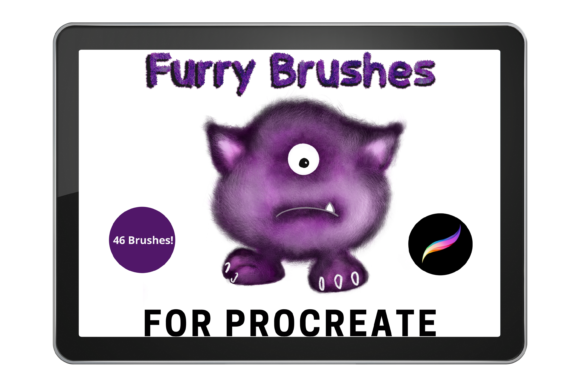
The core value of this specific collection lies in its versatility and hand-crafted nature. The pack consists of 46 varied brushes, each engineered to serve a different purpose in the fur-rendering process. Unlike generic texture stamps, these brushes respond dynamically to your pressure and tilt, providing a more organic feel.
The selection includes everything from soft, fluffy fur suitable for rabbits and cats, to sharper bristles for dogs or wild animals. For those working in fantasy or sci-fi genres, the inclusion of glowing monster fur opens up creative possibilities for depicting magical creatures or bioluminescent entities. This diversity ensures that you are not limited to one style or animal type, making it a robust tool for any digital artist’s library.
Customization and Control
One of the standout features of these brushes is their adaptability. While they come pre-configured for immediate use, they are fully customizable within the Procreate environment. You can resize the brushes using the standard brush resize tool or adjust their scale using the move and transform tools. This flexibility allows you to work on large-scale illustrations or intricate details without losing quality.
Furthermore, the visual impact of the fur can be fine-tuned using Procreate’s built-in controls. By adjusting the opacity slider, you can control the density of the fur, creating layers that look thick and plush or sparse and wispy. Experimenting with different blend modes can also alter how the brush interacts with underlying colors, allowing for subtle shading effects or vibrant highlights. This level of control ensures that every stroke contributes to the overall realism of your artwork.
Who Can Benefit from These Tools
This brush set is not limited to professional illustrators. It serves a wide range of users, from hobbyists looking to improve their skills to entrepreneurs creating assets for commercial projects.
- Beginners: If you are new to digital art, learning to paint fur manually can be discouraging. These brushes provide a forgiving starting point, helping you understand how light and shadow interact with hair textures.
- Character Designers: Creating believable creatures requires consistent texturing. This pack offers the variety needed to differentiate between species, such as the coarse hair of a bear versus the sleek coat of a horse.
- Fantasy Artists: The unique "glowing" and "monster" brushes are ideal for concept artists working on game designs or book covers where imaginary creatures are central to the narrative.
- Pet Portrait Artists: For freelancers specializing in custom pet portraits, speed and accuracy are crucial. These brushes can reduce rendering time while maintaining a high level of detail.
Practical Applications in Digital Art
The utility of Procreate Fur Brushes extends beyond simple animal illustrations. In a professional context, texture is key to storytelling. For example, a children’s book illustrator might use the softer, fluffier brushes to create inviting, tactile characters that appeal to young readers. Conversely, a graphic designer working on a horror-themed poster might utilize the sharper, erratic bristle brushes to create an unsettling, unkempt appearance.
Educators teaching digital art courses can also use this pack as a teaching aid. By demonstrating how opacity and blend modes affect the appearance of fur, instructors can help students grasp fundamental concepts of layering and light. Additionally, small business owners who create stickers, prints, or merchandise featuring animals can use these tools to produce high-quality, market-ready designs efficiently.
Realistic Use Cases
Consider the process of drawing a fox. Instead of painting thousands of individual hairs, you can use a base layer to establish the shape and color. Then, using the medium-length fur brushes, you can build up the volume. Finally, the finer tip brushes can add the stray hairs and highlights that bring the image to life. This layered approach mimics the way real fur grows and catches light, resulting in a more convincing final image.
Another practical example is clothing texture. Heavy wool sweaters, faux fur coats, and fuzzy accessories can all benefit from these brushes. By adjusting the color and opacity, you can transform a flat shape into a textured garment, adding depth and realism to character designs without needing complex manual detailing.
Technical Requirements and Installation
Before purchasing or downloading, it is essential to understand the technical constraints. These files are digital brushes that function exclusively within the Procreate App. They are not compatible with Photoshop, Clip Studio Paint, or other software. To use them effectively, you must have an iPad with the Procreate app installed and an Apple Pencil. The pressure sensitivity of the Apple Pencil is critical for achieving the natural variation in stroke width and opacity that makes digital fur look realistic. Without these specific hardware and software components, the brushes will not work.
The installation process is straightforward but requires a few steps. First, you need a platform to download the files, such as iCloud, Dropbox, or Google Drive. Once downloaded, the file will likely be in a compressed format (ZIP). You will need a program like iZip or the built-in Files app on iOS to unzip the folder. After extracting the contents, you can import the brushes directly into Procreate. They will appear in a named folder within your brush library, keeping your workspace organized.
Important Considerations for Users
While these brushes are powerful, they are not a magic solution for poor technique. Understanding anatomy and light sources remains fundamental. The brushes assist in execution, but the artist must still guide the direction of the fur flow to match the underlying form of the subject. Additionally, because there are 46 brushes in the pack, it can be overwhelming at first. It is advisable to start with a few core brushes—such as a base fluff, a mid-length strand, and a highlight brush—and master those before exploring the more specialized options like glowing or bristle variants.
Finally, remember that digital art is iterative. Do not hesitate to experiment with the settings. Adjusting the jitter, spacing, and streamline features within Procreate can further customize the brushes to suit your personal style. By combining these specialized tools with your creative vision, you can produce stunning, professional-grade furry artwork that stands out in any portfolio.