40 Brick Procreate Brushes: Texture for Digital Art
Digital illustration often suffers from a specific kind of sterility. When you are working on an iPad, the glass surface and perfect vector lines can sometimes make your artwork feel too clean, too digital, and detached from the physical world. This is where texture becomes not just an aesthetic choice, but a narrative necessity. The 40 Brick Procreate Brushes set addresses this gap by providing artists with a robust toolkit for adding tangible, gritty realism to their digital canvases. Unlike standard texture overlays that sit passively on top of your work, these brushes allow you to paint structure directly into your piece, giving you control over every crack, mortar line, and weathered surface.
This collection is designed for creators who understand that environment tells a story. Whether you are illustrating a dystopian cityscape, designing packaging for an artisanal coffee brand, or creating social media graphics that need to stop the scroll, the tactile quality of brick, concrete, and stone adds immediate weight and authenticity. The set includes forty distinct seamless brushes, meaning you can cover large areas without visible repetition artifacts, a common frustration with lower-quality digital assets. By integrating these tools into your workflow, you move beyond flat color blocks and into a realm of rich, layered visual communication.
Beyond Flat Color: Adding Structural Depth
The core appeal of the 40 Brick Procreate Brushes lies in its versatility and specificity. While many texture packs offer a generic "grunge" effect, this set is meticulously categorized to help you build realistic architectural elements. You are not just slapping on a filter; you are constructing walls, pavements, and floors with intention. The brushes mimic the irregularities of hand-laid masonry, the smooth yet porous nature of poured concrete, and the rugged unpredictability of natural stone.
For concept artists and illustrators, this level of detail is crucial for establishing mood. A sleek, modern building rendered with sharp lines feels cold and corporate. However, by using the concrete brushes from this set to add subtle surface imperfections and weathering, you instantly ground the structure in reality. It suggests history, usage, and exposure to the elements. Similarly, the brick variations allow for diverse architectural styles, from the warm, rustic charm of a countryside cottage to the imposing, uniform rigidity of an industrial warehouse. The seamless nature of these brushes ensures that whether you are filling a small corner or an entire background, the texture remains consistent and believable.
Moreover, these tools are not limited to background elements. They can be used creatively in logo design and brand identity projects where a tactile feel is desired. Imagine a logo for a craft brewery or a boutique construction firm that incorporates subtle stone textures within the letterforms. Using these brushes, you can mask and reveal textures with precision, creating a custom look that stands out against the sea of flat, minimalist logos dominating the market. This approach bridges the gap between traditional print aesthetics and modern digital delivery, offering a unique visual hook.
Practical Applications Across Creative Industries
The utility of this brush set extends far beyond fine art illustration. In today’s content-driven economy, visual distinctiveness is currency. For marketers and social media managers, creating graphics that feel handmade or textured can significantly increase engagement. People are drawn to organic shapes and materials because they evoke sensory memories. A promotional post for a real estate agency featuring a textured stone background conveys stability and permanence far more effectively than a solid blue rectangle. The 40 Brick Procreate Brushes enable non-designers and professionals alike to produce high-end social media graphics that look professionally curated rather than templated.
In the realm of packaging design, texture is often simulated through printing techniques like embossing or spot UV. However, during the digital mockup phase, having realistic textures is vital for client presentations. You can use these brushes to simulate how a label might look on a textured paper stock or how a box might appear if made from recycled, rough-cardboard materials. This helps stakeholders visualize the final physical product more accurately, reducing the gap between concept and production. It is a powerful tool for pitching ideas that rely on tactile appeal.
Furthermore, for those involved in web design and UI/UX, while heavy textures are less common in interface elements due to load times and accessibility concerns, they remain highly relevant in hero sections, landing page backgrounds, and editorial layouts. Using these brushes to create custom header images or section dividers can add character to a website without compromising usability. The key is subtlety. The seamless nature of the brushes allows you to create low-opacity backgrounds that add depth without distracting from the primary content or affecting readability.
Technical Integration and Workflow Tips
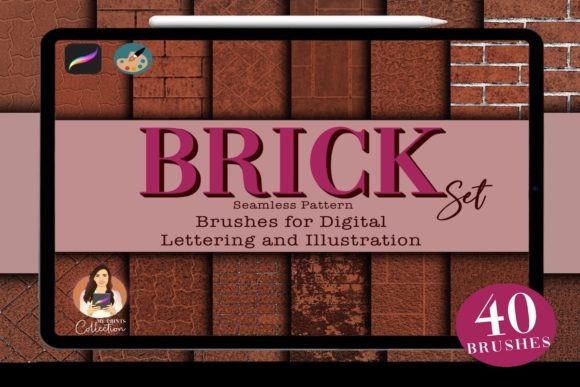
Understanding the technical specifications of your tools is essential for a smooth creative process. The 40 Brick Procreate Brushes come as a single .brushset file, which makes installation straightforward for any user familiar with the Procreate ecosystem. It is important to note that this is a digital product specifically tailored for the Procreate app, requiring version 5 or higher. It is not compatible with Adobe Photoshop or Illustrator, so users working primarily in vector-based workflows should consider this limitation. However, for raster-based painting and illustration on the iPad, it integrates seamlessly into your existing library.
Upon purchase, you will receive a zip file sized at 47.1 MB. This relatively compact size ensures quick downloads even on slower connections, while still containing high-resolution data for crisp results. Included alongside the brushes is a .swatch file containing a curated color palette. This is a thoughtful addition, as selecting the right hues for masonry and stone can be tricky. The included palette likely offers earthy tones, grays, and muted colors that complement the textures, helping you achieve a cohesive look faster. Utilizing these pre-selected colors can save time and ensure that your textures do not clash with the rest of your composition.
To get the most out of these assets, experiment with layer blending modes. Multiplying the texture layers over your base colors can deepen shadows and enhance the three-dimensional effect, while overlay or soft light modes can integrate the texture more subtly. Adjusting the opacity and using the Apple Pencil’s pressure sensitivity allows for dynamic variation in the brush strokes, mimicking the natural irregularities of real-world materials. Always test your textures at the final output size to ensure they retain their detail without becoming pixelated or overly noisy.
Ultimately, the 40 Brick Procreate Brushes represent a valuable investment for any digital creator looking to expand their textural vocabulary. They offer a practical solution to the problem of digital flatness, providing the tools needed to create art that feels grounded, authentic, and visually engaging. Whether you are a seasoned illustrator or a small business owner creating your own marketing materials, these brushes empower you to add a layer of professional polish and tactile realism that resonates with audiences. By mastering these tools, you elevate your digital work from simple images to immersive visual experiences.